Posts

Showing posts with the label IndieDev

Project Tundra Cont...
Image
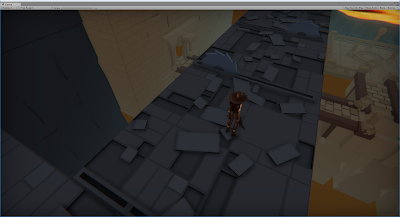
Been a short while since I posted about my dungeon crawler: Project Tundra (Mainly due to new PC and refactoring some code base which wasn't too exciting tbh) I've changed the original character to a female hunter for now, the animations are in a pseudo state of setup, but the code base for her movement has changed and now it plays a lot smoother - Committing to the point and click to move, the character follows the direction of the mouse if held down too. I'm attempting to showcase are more pleasing aesthetic on the level design, adding a depth to the levels to make them more interesting when passing through. Simple enough to do in theory, but getting the right feel will take quite a few iterations. A few screenshots below showing a few added "levels" utilizing the XYZ axis a little more when creating the initial layout of the levels. In addition, I decided to tinker with the unity particle effects to create a portal VFX (In conjunction with ...

Asset Placement 101

Image
I say 101 but it's pretty basic and not ironclad by any stretch of the imagination - For all intents and purposes this is the most primitive design ideology/common sense that should be utilized when making levels - I'll stress the point here this is why we do a quick mock up level! when I started my original block out of what I wanted the level to look and feel like I started running into the basic issues that always arise; a few of these are generally aesthetic but a select few are general design principles - Let's examine: This was the first pass of an elevated stairway - the main issue is apart, think of this as a third person or even isometric game, what would the first thought be around the circled areas??? Space!? There's a lack of it for sure. Given the size of the room, the character, the enemies, puzzles and environments etc etc etc, there will be little space to move around/up the stairs without causing some obvious issues. Now this is of course dep...

Embed The Narrative! And the mechanics?

Image
Embed The Narrative!  And the mechanics I guess!  Something I enjoy doing a lot with assets is to embed them into the narrative, again this is simple stuff but often times it goes unnoticed. If done well it pays off in the long run, though this is often limited to assets available when creating levels (in this case I don't have loads). This method of asset placement or mechanic introduction can help teach the player without being intrusive about it. Here's an obvious example: Now this is the most rudimentary example of embedded narrative; a dead corpse propped against a wall. First thoughts on seeing this from a players perspective are generally: "eh a dead guy" or "that's interesting" - a few other thoughts are likely related to why the corpse is there/what happened to it/can I loot this etc etc. This can be used to a heightened degree later on, and be more inconspicuous, for example - if you were to create a boss room later on with say a l...

...here's the rest of the lighting post...

Image
for some reason blogger is limiting me to display 2 gifs per blog post when I embedded. Anyway, here's the final shot I decided I liked the lighting with, though it will require a polish pass at some point, i feel it works quite nicely for the most part, though this might be to to starting/tweaking it for ages.

More Lighting...

Image
So, I decided I liked the flames, and there will likely be braziers of flames/fire or candles and such throughout the dungeon, as such, i wanted to try some lighting to help add some "immersion" of sorts. Now, this will take more work, but the general idea is there for "flicking lights" The script essentially adjusts the intensity/bias/range of the the light source it's attached too, needs some work here but it stabilises out at the end somewhat. Here's what happens when it goes wrong...

Lighting pass 0.01

Image
Found some simple fire I wanted to try some speed lighting. I also hooked up a few of the animations for attacking/spin attack - At this point I also made the enemies/player do damage but It keeps bugging out...I need to fix this a.s.ap!

Floor is slippery when wet...

Image
... and evidently when it's made of stone... So, hooking up the player character animations and movement controls was a time consuming process. And it works...for the most part. This was my first pass at implementing movement/playable character into unity - granted having a fully animated player character to import helps a tonne, but splitting out the animations and linking them up when the character runs/walks was a new experience for me. I create a small dummy hallway of sorts to get a sense of scale, movement, enemies and all that jazz. Here's a gif to show it semi working: Now, the thing to take from this is, my initial pass I was still unsure of what kind of camera/control scheme I was going to utilize in this level/game/prototype/vertical slice/buzzword 5/thing. The method above shows the characters direction being oriented around the mouse location, the beginnings of a point and click...sort of..or more accurately, WASD and the mouse will aim the character - ...

Foundation and general objective based coding...? Update

Image
A lot of progress has been made on laying the foundation of this project. First and foremost, the assets needed a lot of work ( hey they were free, so I can't complain) so I got started on that, but I'll talk about that more down the blog. Step 1: General functionality. In the last update I got the WASD movement for the camera and bound the mouse for edge scroll. This working nicely, but I will improve on that later. I needed to get to grips with the ability to create objects and place them in the world. For this (As I wanted to eventually place a lot of buildings) I made the foundation functions, primarily, "If button is pressed > create a ghost instance of a build > depending on the button clicked will change the static mesh of the building that will be placed. For generic flow, I used a Square and Pyramid to differentiate between the two objects i was placing; This was mainly to allow for non overlap systems and multiple buttons. Disclaimer: There is a l...